A paystub is far more than a routine piece of paperwork. It is a vital financial document that you receive as an employee, touching everything from your current budget to your long-term tax liability and retirement savings with lenders and landlords.
Understanding the pay stub definition and learning to read your pay stubs carefully gives you the tools to catch errors, optimize your withholdings, verify your benefits, and make smarter financial decisions. In an era where payroll software handles most of the calculations, and errors can still slip through, an informed employee is the last line of defense. If you are looking for a reliable free paystub generator, there are simple online solutions that allow you to create error-free pay stubs within minutes.
In this guide, we will be taking a close look at what is a pay stub and how it helps employees. So, without further ado, let’s get started.
What Is a Pay Stub?
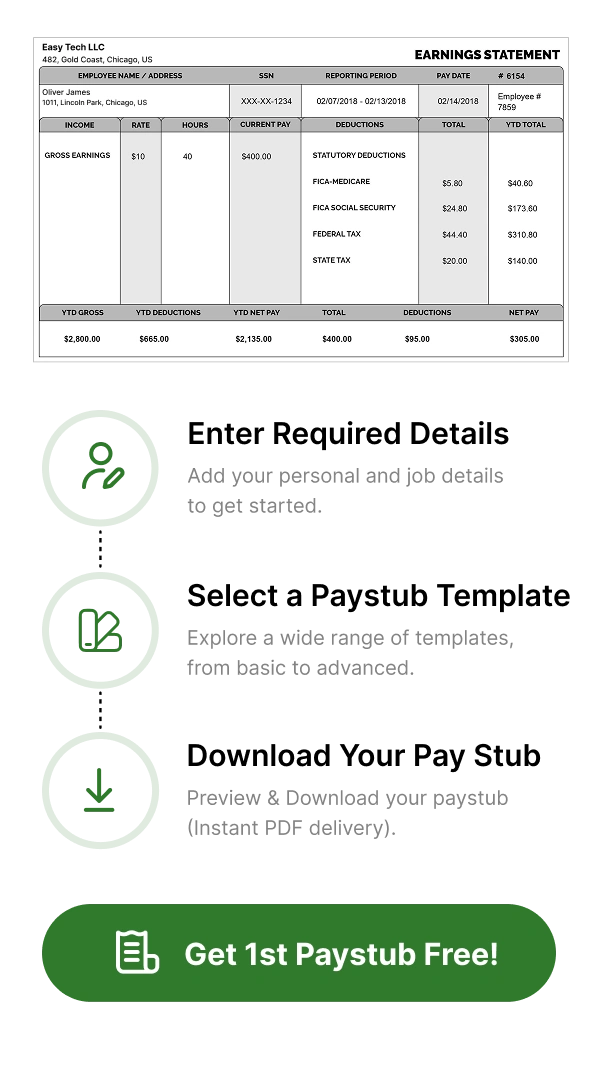
A pay stub is an official document issued by an employer that provides a detailed breakdown of an employee’s earnings, deductions, and net pay for a specific pay period. It accompanies every paycheck or direct deposit and serves as a transparent record of exactly how your gross wages were calculated and where each dollar went before it reached your bank account.
A paystub tells you about three things:
- Gross pay
- Taxes, insurance, retirement contributions
- Net pay
A pay stub is more than just a record of your paycheck. It is an important document that helps you verify your income, file taxes, check for payroll errors, apply for loans, and prove your employment history.
Your pay stub is also connected to your W-2 form. The year-to-date (YTD) totals shown on your final pay stub of the year should generally match the income and tax information reported on your W-2. This helps ensure your payroll records are accurate when filing taxes.
What important information is available on a pay stub?
The following information is available on a pay stub:
Employee & Employer Information
- Employee’s full name
- Employee address
- Employee ID or Social Security Number
- Employer name and address
- Employer Identification Number (EIN)
Pay Period Information
- Pay period start and end dates
- Pay date
- Pay frequency
Earnings Section
- Regular hours worked and regular pay
- Overtime hours worked and overtime pay
- Any bonuses, commissions, or supplemental wages
- Reimbursements
- Gross pay
Tax Withholdings
- Federal income tax withheld
- State income tax withheld
- Local/city income tax withheld
- Social Security tax
- Medicare tax
Deductions
- Health, dental, and vision insurance premiums
- 401(k) retirement plan contributions
- Health Savings Account (HSA) or Flexible Spending Account (FSA) contributions
- Life insurance and disability insurance premiums
- Wage garnishments
- Union dues
Net Pay
- This is the total amount that an employee takes home
YTD Totals
- Cumulative gross earnings, taxes, deductions, and net pay since January 1 of the current calendar year
How to read a paycheck stub?
Reading a paycheck stub can feel overwhelming for quite some time, but each section of a paystub follows a pattern. Below is how you can read a paycheck stub easily:
1) Verify your personal information: Confirm your name, address, and employee ID are correct. An error here can cause problems with tax filings.
2) Confirm pay period and pay date: Ensure that the pay period dates match the work period you are being compensated for. Confirm the dates with your employer’s published payroll schedule.
3) Review your gross pay: Gross pay is your total earnings before any deductions. For hourly employees, verify that the hours listed match your own records. For salaried employees, verify the pay rate matches your employment agreement.
4) Review tax withholdings: Cross-reference the federal and state income tax withheld against your W-4 form.
5) Check every deduction: Go through line by line through all the deductions. Confirm that benefit deductions match what you have selected. Also, verify that no unauthorized deduction appears.
6) Confirm Net pay: Net pay should equal your gross pay minus all listed deductions.
7) Review YTD totals: Year-updated data is cumulated with each pay period. Monitoring YTD totals enables you to monitor your annual profit momentum and estimate your tax liability at any stage in 12 months.
Paystubs vs. Pay Stubs: Is There a Difference?
There is no particular difference between paystubs and pay stubs. Both terms refer to the same document, which shows details about an employee’s earnings, deductions, taxes, and net pay for a particular pay period. The only difference is in formatting and spelling.
- Pay stub: Most commonly used and grammatically correct form.
- Paystubs: A globally accepted variation that is used by employers and online payroll records.
| Factors | Paystubs | Pay Stubs |
| Definition | A document showing employee earnings, deductions, and net pay | A document showing employee earnings, deductions, and net pay |
| Difference | No difference | No difference |
| Spelling | One-word | Two-word |
| Example | Access your paystubs online | Download your pay stub from the employee portal |
Common Abbreviations on Paystubs or Pay Stubs Explained
YTD: Year-to-Date
FICA: Federal Insurance Contributions Act
FIT / FWT: Federal Income Tax / Federal Withholding Tax
SIT / SWT: State Income Tax / State Withholding Tax
OASDI: Old-Age, Survivors, and Disability Insurance
MED: Medicare
401(K): 401(K) retirement contributions
HSA: Health Savings Account
FSA: Flexible Spending Account
GTL: Group Term Life Insurance
STD / LTD: Short-Term Disability / Long-Term Disability
OT: Overtime
REG: Regular Pay
PTO: Paid Time Off
NET: Net pay
GROS: Gross pay
EE: Employee
ER: Employer
Why Do You Need a Pay Stub?
A pay stub is an important document that showcases how much you have earned during a pay period and deductions taken from your paycheck. Below are the common reasons why you might need a pay stub:
- Verify your income when applying for loans, mortgages, or credit cards.
- Rent an apartment or qualify for housing applications.
- Track your earnings and ensure you are being paid correctly.
- Review taxes and deductions such as federal taxes, state taxes, Social Security, and Medicare.
- Prepare and file taxes accurately at the end of the year.
- Verify employment history for new jobs or background checks.
- Resolve payroll errors by comparing your earnings and deductions with company records.
- Apply for government benefits that require proof of income.
Are Employers Required to Provide Pay Stubs?
There is no national law that demands that businesses provide an employee with a pay stub at the end of the pay period in the USA, but the FLSA requires all employers to accurately keep payroll records that include the number of hours worked, total wages paid, the pay rate given to the employee, and how much has been deducted from his/her pay and maintain such records for a minimum of 3 years from the last paycheck and must be available to the Department of Labor at all times upon request.
At the state level, most states enforce their own pay stub requirements. If your country calls for pay stubs and your employer fails to provide them, it is generally advisable to document a complaint with your nation’s Department of Labor.
If a state doesn’t have any formal law about this, employers are still strongly recommended to give pay stubs to their employees each time they get paid as a best work practice. This is not only to keep the trust of employees but also to have a solid ground against cases of payment disputes.
How to Access Your Pay Stubs?
For accessing your pay stubs, the method includes:
- Employer Payroll Portal: Most business employers use payroll platforms like ADP, Workday, or Paychex. Employees log in with their company email ID and password to view and download current pay stubs.
- Employee Self-Service Portal: Most of the companies integrate payroll information into a broader HR system accessible through the company app.
- Direct Request to HR: If your employer does not have a self-service portal, you can request pay stubs directly from your HR department.
- Physical Paycheck Envelope: Employers issue physical paychecks, which are included in the envelope along with the check.
In case you’re not able to locate your pay stub, you will need to contact your HR department immediately.
How long should you keep your pay stubs?
Keep for 1 year: Save all of the pay stubs from this year until you have reconciled your W-2 in January. As long as the figures on your W-2 match your final YTD totals, you can safely discard your monthly pay stubs from this year, but be sure to keep the last one of the year.
Keep for 3 years: Keep your year-end pay stubs and W-2s for a minimum of three years because that is the usual time period in which the IRS may conduct an audit for most taxpayers. Besides that, the FLSA also obliges employers to keep payroll records for a period of three years.
Keep for 7 years: When filing tax returns that show either business income, rental income, significant investment activity, or unusually large deductions, keep all documentation for 7 years (the duration of the auditing period set forth by the IRS).
Keep Permanently: If you ever finish looking for a W-2 that doesn’t turn up, a year-end pay stub can work as a backup record of your earnings. By keeping your final annual pay stubs forever, you are basically buying a cheap insurance policy for any time you might need it in the future.
Key Takeaways
A pay stub is much more than just an ordinary piece of paperwork. In fact, it’s one of the most crucial financial documents that you get as an employee, having a say in your present budget, future tax liabilities, retirement contributions, and even your financial standing with lenders and landlords.
Getting to know the pay stub meaning and practicing reading your pay stubs thoroughly will provide you with the means to detect mistakes, adjust your withholdings, confirm your benefits, and set a course for wiser financial decisions. Today, when payroll software does most of the figuring, mistakes can still happen. Being a knowledgeable worker can be a very effective last line of defense.
FAQs
1) What does a pay stub do?
A pay stub helps employees encrypt their paycheck stubs, as it is useful for employers while solving wage and hour disputes.
2) What do you mean by paystub?
A paystub is a paper document that summarizes an employee’s gross pay, taxes, and net pay from salary, hourly wages, or commissions.
3) What is another name for a paystub?
Another common name for a paystub is “payslip,” “wage statement,” or “salary slip.”
4) How do I get a paystub?
You can also get your pay stub from your bank if you are paid through direct deposits by your employer. Usually, you request your bank, and it will get the pay stub for you. Also, you may collect your pay stub directly from your employer’s employee website or payroll department.
5) Can I create my own pay stubs?
With our online paystub creator, you can create professional paystubs for your business.
6) What is the purpose of a pay stub?
A paystub, also called a payroll, is a report given to employees at each pay period, along with records about their gross pay, tax withholding, and any employee deductions made to their revenue. Paystubs are generally used for document protection and to ensure employees are paid correctly.
7) Is the paystub the same as a salary slip?
A pay stub, additionally called a pay slip or pay check stub or salary slip, is a document given to employees by their employers that outlines their benefits for a specific pay period in addition, additionally showing information on the gross profits, taxes, and deductions.
8) What can I use instead of a pay stub?
If you need to confirm income and don’t have traditional pay stubs, you can use financial institution statements, tax returns, or a valid organization letter. For self-employed individuals, a profit and loss (P&L) statement and 1099 paperwork are common options.
9) How to spot a fake payslip?
Seeing a fake paycheck calls for checking for formatting discrepancies, mathematical errors in tax deductions, and inconsistent agency details. Pass-reference the slip with authentic authorities’ tax portals, direct employment verifications, and genuine financial institution details to confirm authenticity.
10) How do companies verify payslips?
Companies confirm revenue slips through rigorous historical past looking at systems, combining document analysis, financial institution file assessment, and direct organization outreach. HR teams or third-party historical past verification (BGV) carriers use those primary strategies to validate files and ensure accuracy.